Servo Control
Copyright © Quectel Wireless Solutions Co., Ltd. 2026. All rights reserved.
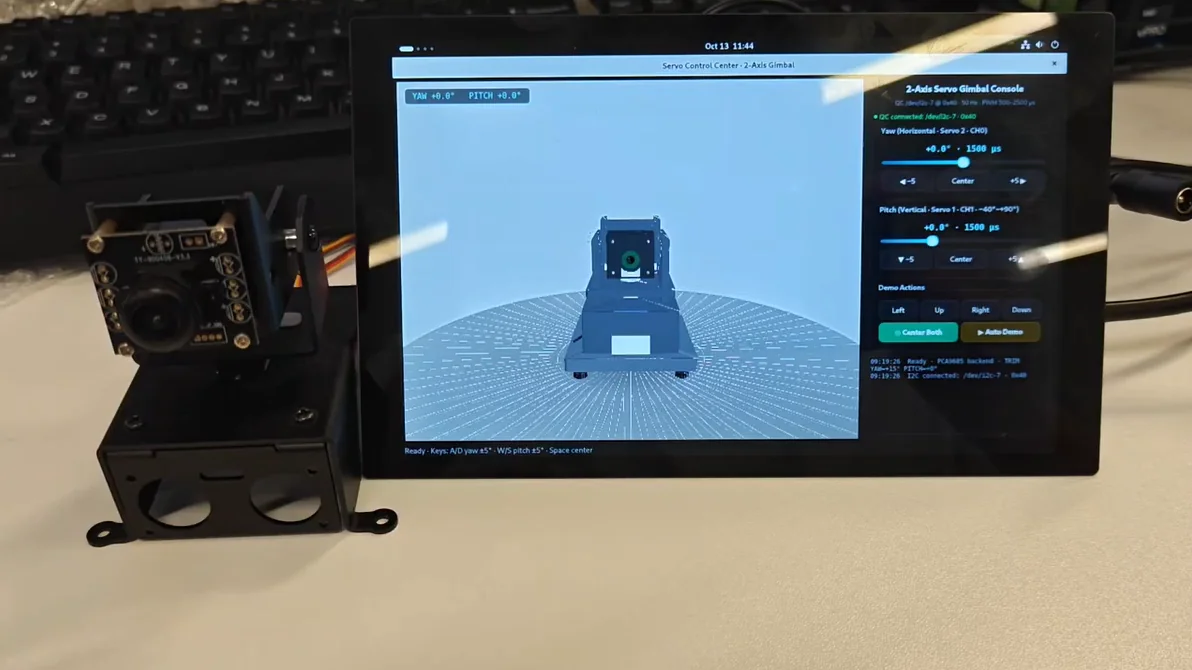
This project is a 2-degree-of-freedom servo pan-tilt control example implemented based on the Quectel Pi M2 intelligent main control board.
The system drives the two LFD-01 servos on the two-dimensional pan-tilt via the PCA9685 servo driver board, and implements multiple control modes including sliders, buttons, shortcut keys and automatic demonstration in combination with the graphical interface. The 3D view on the left rotates synchronously with the physical object, fully demonstrating the control chain of “UI angle command → PWM pulse width → actual servo attitude”.
Collection of Development Resources
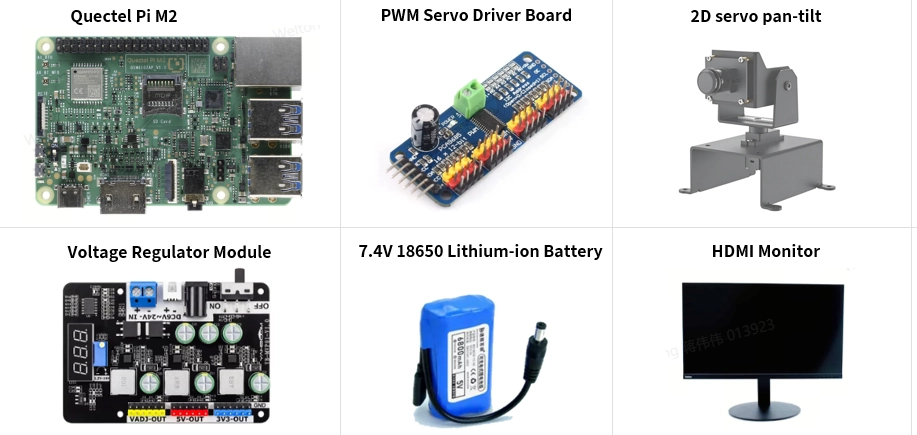
List of Development Accessories
|
|
|
|---|---|---|
Part Name |
Quantity |
Specifications |
Quectel Pi M2 Intelligent Main Control Board |
1 piece |
- |
PCA9685 Servo Driver Board |
1 piece |
|
2-axis Servo Gimbal (with Camera) |
1 piece |
|
Dual-channel step-down voltage regulator module |
1 piece |
|
18650 Battery Holder (2S) |
1 piece |
|
Display screen (optional) |
1 piece |
An HDMI display will also work |
DuPont wires / multimeter / screwdriver |
several |
- |
Parts Physical Reference
Quick Start
Development Preparation
Quectel Pi M2 intelligent main control board comes pre-installed with Debian 13 system mirror by default, so there is no need to re-flash the mirror, just follow the steps below to operate.
hardware connection
Complete all the following hardware connection operations, and the serial numbers shall be consistent with those in the interface schematic diagram:
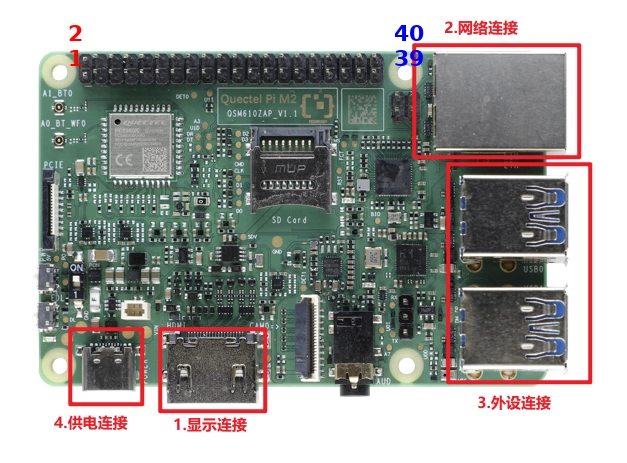
Signal Connection: Connect the PCA9685 driver board to the Quectel Pi M2 40-pin header according to the following correspondence ——
Pin1(3.3V)→VCC, Pin9(GND)→GND, Pin27(SDA)→SDA, Pin28(SCL)→SCL (i.e., /dev/i2c-7).
Power Connection: Connect the positive and negative terminals of the battery pack to the IN port of the voltage regulator module (it is recommended to connect a power switch/fuse in series); the fixed 5V output port of the voltage regulator module is connected to Pin2/Pin4 to supply power back to the main control board (you can also use Type-C to power the development board, but note that the two power supply methods cannot be used simultaneously); after adjusting the custom port of the voltage regulator module to 5.0~5.5V, connect it to the **V+** terminal of the PCA9685 to supply power to the servos.
Common ground connection: Connect the GND of the voltage regulator module to Quectel Pi M2’s Pin9 and the GND of the PCA9685 to the same node — common grounding is a prerequisite for normal I2C communication, so be sure to connect it properly.
Steering Gear Connection: The signal wire of steering gear 2 (YAW) is connected to CH0 of PCA9685, and the signal wire of steering gear 1 (PITCH) is connected to CH1; the power wires of the two steering gears are connected in parallel to the V+/GND pin header. Note the wire sequence of LFD-01 brown/red/orange = GND/5V/signal, reverse connection will burn out the steering gears.
Power supply connection: Finally, just turn on the battery switch — the voltage regulator module supplies power to both the main control board and the steering gear; after the program starts, it will automatically send the “corrected centering position”, so the gimbal will be centered immediately upon power-on, eliminating the need for the previous two-step sequential power-on process.
Note:tips
After the connection is completed, you can use i2cdetect -y 7 for verification; if the output shows 0x40, it means the PCA9685 communication is normal. Be sure to supply power separately for VCC (logic power, several mA) and V+(power supply, ≥1A), and do not connect them in a mixed manner.
Project Implementation
Get Code
Open the terminal on the intelligent main control board, and use git to clone the project code.
sudo apt update
sudo apt install -y git
git clone https://github.com/Quectel-Pi/demo-servo-gimbal-control.git
After the execution is complete, the demo-servo-gimbal-control folder should be generated in the current directory.
Install Dependencies
Navigate to the project directory, create an isolated environment and install Python dependencies.
cd demo-servo-gimbal-control
python3 -m venv .venv
.venv/bin/pip install -r requirements.txt
Run the program
python3 run_gimbal.py
run_gimbal.py will automatically locate the isolated environment within the project, complete and display the authorization, and then launch the program; if the program starts normally, a Servo Control Center window will pop up, with a 3D physical view on the left and a control panel on the right.
Control Mode
3D view on the left + control panel on the right, drag the slider / use shortcut keys / 3D model and physical device rotate synchronously and smoothly during demonstration; the status light is green when
I2C connected: /dev/i2c-7 · 0x40indicating the real device is online, and amber whenSimulation modeindicating simulation is active.
|
|
|---|---|
Control Mode |
Control Function |
Drag the Yaw slider |
Yaw Angle Adjustment |
Drag the Pitch slider |
Pitch Angle Adjustment |
|
Yaw Step / Centering |
|
Pitch Stepping/Centering |
Keyboard |
Yaw ±5° |
Keyboard |
Pitch ±5° |
Keyboard |
biaxial centering |
|
One-click preset pose |
|
Auto Demo (3-cycle Sweep) |
Application Demo
Frequently Asked Questions and Solutions
The program displays Simulation mode
Phenomenon:
Simulation mode (no PCA9685 on /dev/i2c-7)
Solution:
Check whether the power supply of PCA9685 is normal: the voltage measured at the V+ terminal should be 5.0~5.5V.
Use the command to confirm whether the bus and the chip are present:
ls /dev/i2c-7
i2cdetect -y 7
Check whether SDA/SCL are reversely connected and whether the common ground is properly connected (GND of the voltage regulator module ↔ Pin9).
Check
smbus2whether it is already installed, and re-perform the dependency installation steps if necessary.
The servo motor is powered (and locked in place) but does not move at all
Phenomenon:
i2cdetect -y 7 shows 0x40; the servo has resistance but does not rotate at all
Solution:
This phenomenon is usually caused by the PCA9685 chip entering the SLEEP state, and this program has a built-in mechanism of forced SLEEP bit clearing upon wake-up + per-second wake-up maintenance for self-healing. Simply upgrade to the current version and restart the program to resolve this issue automatically.
If it still does not work after restarting, check whether the OE pin on the board is grounded (floating or high level will disable all outputs).
Jitter/abnormal noise occurs when the steering gear rotates
Phenomenon:
Jitter or abnormal noise occurs in the steering gear during the movement of the gimbal.
Solution:
This issue is mostly caused by excessive ripple of the voltage regulator module or voltage drop, and a 1000µF electrolytic capacitor can be connected in parallel between the V+ and GND terminals.
Make sure the output voltage of the custom port is within the range of 5.0~5.5V, and avoid it being lower than 4.5V or continuously higher than 6V for a long period.
The steering gear only rotates on one side
Phenomenon:
Only one of the yaw or pitch axes responds.
Solution:
Check the connection of the signal lines corresponding to the CH channels (CH0 = yaw, CH1 = pitch).
Check whether the power cord of this servo motor is properly connected; you can use a multimeter to measure the voltage between V+ and GND.
Technical Support and Contributions
If you encounter any issues during use, please feel free to Quectel Official Forum to submit a technical inquiry, and our technical support team will provide you with a timely response.
Project open source repository: https://github.com/Quectel-Pi/demo-servo-gimbal-control
You are welcome to submit an Issue to report problems or a Pull Request to contribute code improvements!